Importing files
File → Import…, or drag the file onto the window. Raily
recognizes the format from the extension. Drag files that belong together at the same time, such
as an .obj with its .mtl, otherwise the model stays without color.
| Format | Comes in as |
|---|---|
| STL | a solid, after a preview dialog |
| 3MF, glTF/GLB | a solid, after a dialog for scale and up axis; lamps and cameras come along |
| OBJ, 3DS | a solid, directly in the plan |
| DXF, HPGL, SVG | lines, arcs, polylines and areas |
| PNG, JPG, GIF, WebP | a 2D image at the pointer |
| R16 | a texture from Raily 4 |
| .arf, .rly | a plan or module, see below |
Checking 3D models
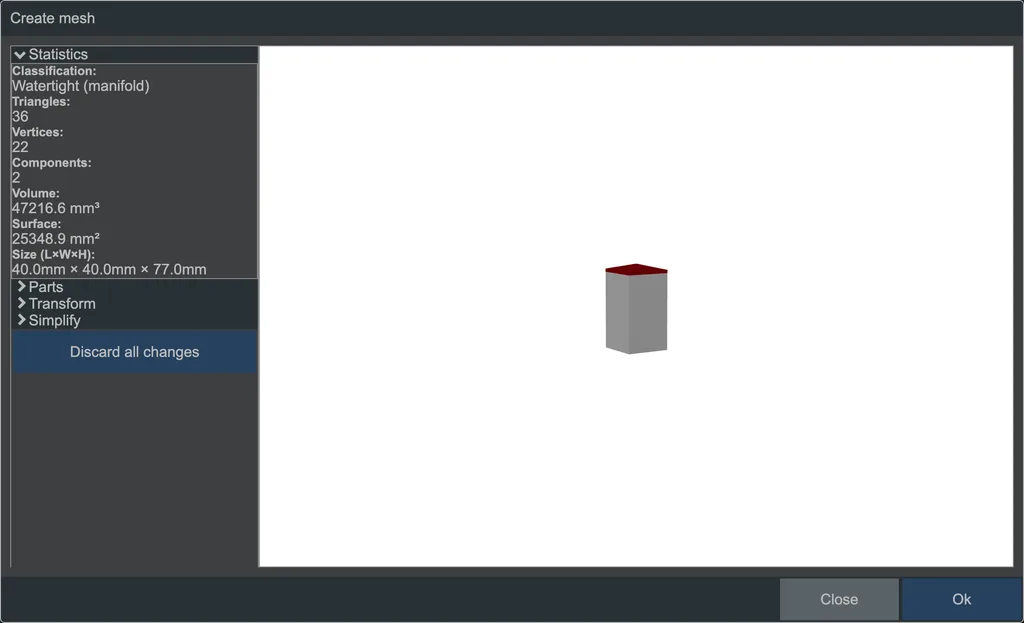 The dialog when importing a mesh file.
Two things are often wrong in models from other sources:
- The unit. STL stores none. Compare the displayed Dimensions with what you expect: a house 120,000 mm tall was saved in meters. Models for 3D printing are often 1:1 and need to be scaled down to your layout scale.
- The up axis. If the model lies on its side, rotate it 90° about X.
The number of triangles tells you what the model will cost to render. A model for 3D printing can have more triangles than an entire track layout; Simplify reduces them. The same dialog repairs holes and duplicate faces, also afterwards via Process mesh… in the imported model's context menu.
Plans and modules
An .arf file with a plan asks "Replace old plan?": Replace, Insert (the elements
hang from the pointer) or Open in new tab. A plan from Raily 1 to 3 (.rly) can only be
replaced or opened in a new tab.
If a module is in the file, Raily asks "Install module?": Install puts it permanently in your library, This session only does not. If you already know the module, Raily first shows which elements were added and which were dropped.
See also
- Import a heightmap: terrain from an image
- 3D export (STL, 3MF, glTF)
- Performance tips